Welcome
Welcome to Therapists Space, a resource space created by a therapist, for therapists.
If you're a trainee or newly qualified practitioner, you may have noticed something: while our training programs provide excellent grounding in theory and therapeutic practice, they sometimes leave us feeling overwhelmed by the practical realities of setting up and running a practice. Questions about managing finances, organizing client records, creating systems, and navigating the day-to-day logistics can feel daunting.
I created this website to share how I found my way through these challenges. My hope is that by documenting the systems I've developed and the tools I've created, I can offer you a landing place, somewhere to start forming your own ideas and approaches. You don't need to follow my path exactly, but perhaps seeing how one person navigated these waters will make your own journey feel more manageable.
If you are a client or interested in learning more about my therapeutic practice, please visit my psychotherapy website for clients.
What You'll Find Here
This website offers practical resources across several areas:
- About Me: My journey from software engineering to psychotherapy and my person-centred approach
- Website: Step-by-step guidance for creating your own professional therapy website using GitHub and AI tools
- Accounting: Practical systems for managing the financial aspects of your practice, including business account setup
- Publications: My dissertation on boundaries and visual representations of person-centred concepts including the 7 Stages of Process, Power in Relationships, the 6 Conditions, and Personal Depth
- Community: Links to communities and resources I've found valuable in my therapeutic journey
Everything shared here is offered in a person-centred spirit, not as prescriptive rules, but as possibilities for you to consider, adapt, or reimagine in ways that fit your own unique practice and way of being as a therapist.
About Me
My journey to becoming a psychotherapist began in what might seem like an unlikely place: the world of software engineering and agile project management. For over ten years, I worked as a software engineer and agile scrum master in leading financial institutions, where I developed strong analytical thinking, problem-solving skills, and a deep understanding of how systems work.
While this career was intellectually rewarding, I felt drawn to work that engaged more directly with people and their inner worlds. This led me to begin training at the Metanoia Institute, where I spent nine years completing my MSc in Contemporary Person Centred Psychotherapy. This extensive training period allowed me to deeply immerse myself in the theory and practice of person-centred therapy, while also integrating my previous experiences in ways I hadn't anticipated.
Bringing Two Worlds Together
My background in technology has influenced my therapeutic work in unexpected ways. Throughout my training, I found myself creating publications and visual representations of person-centred psychotherapy concepts, representations that help make abstract theoretical ideas more concrete and accessible. Many of my peers and supervisors found these publications helpful for teaching students and even for use in conversations with clients.
These diagrams and visual tools became a way of bridging my two professional worlds: using systematic thinking and visual design to illuminate the depth and complexity of therapeutic theory. You'll find many of these publications in the Research & Publications section of this website.
My Therapeutic Approach
My practice is grounded in person-centred theory, which emphasizes the actualizing tendency present in all of us, the innate drive toward growth, healing, and fulfilling our potential. I work to create a therapeutic relationship characterized by genuineness, unconditional positive regard, and empathic understanding, trusting in each person's capacity for self-direction and self-understanding.
This same person-centred philosophy shapes how I approach sharing resources through this website. During my training and early years of practice, I experienced firsthand how overwhelming it can be to navigate the practical aspects of starting a therapy practice. Creating Therapists Space is my way of extending the person-centred values of support and non-directive guidance to fellow therapists finding their own way.
Get in Touch
I'd love to hear from you! Whether you have questions, feedback, or would like to connect about peer therapy resources, please feel free to reach out.
Email: jennifer.wei.du@gmail.com
Response Time: I typically respond within 24-48 hours
Create Your Website for Free
I decided to create my website by myself with assistance from AI. I checked various hosting services, their costs, as well as the support they offered. In the end, I decided to choose GitHub to host my static psychotherapy website, as it's free of charge. GitHub is a leading version control platform within the software engineering world, and its GitHub Copilot can help me create and update my website without needing to go into the code level to make changes myself.
If you're a student, you also get free access to GitHub Copilot AI Pro (with student status verified). This makes it an even more attractive option for trainees who are setting up their first professional website.
1. Register with GitHub and Create a Repository
Start by creating a free account at GitHub.com. Once you're logged in, create a new repository by clicking the "+" icon in the top right corner and selecting "New repository". Give it a meaningful name (for example, "psychotherapy-website"). Make sure to check the box to initialize with a README file. This repository will store all your website files and GitHub will automatically host it for free using GitHub Pages.
If you are a student, you can get free access to GitHub Copilot Pro through the GitHub Student Developer Pack. Visit GitHub Education and click "Get your pack" to verify your student status. You'll need to provide proof of enrollment (such as a school-issued email address or documentation). Once verified, you'll have access to premium features that normally require payment.
2. Download and Install Git Bash
Git Bash is a tool that allows you to interact with GitHub from your computer. Download it from git-scm.com and follow the installation wizard. You can use the default settings during installation. Git Bash will enable you to clone (download) your repository to your computer and later push (upload) your changes back to GitHub.
3. Download and Install Visual Studio Code
Visual Studio Code (VS Code) is a free, powerful code editor where you'll work on your website. Download it from code.visualstudio.com. After installation, you'll also want to install the GitHub Copilot extension from the Extensions marketplace within VS Code. This AI assistant will help you create and modify your website content without needing to learn coding from scratch.
4. Clone Your Repository and Create Your Website
Open VS Code and use the terminal (you can open it from the menu: Terminal → New Terminal). Use the command git clone [your-repository-url] to download your repository to your computer. You can find your repository URL on your GitHub repository page by clicking the green "Code" button. Once cloned, open the folder in VS Code. Now you can ask GitHub Copilot to help you create your website by describing what you want. For example, "Create a simple professional psychotherapy website with an about page and contact form."
5. Install Live Server and Preview Locally
In VS Code, install the "Live Server" extension from the Extensions marketplace. This allows you to preview your website locally on your computer before publishing it. Right-click on your HTML file and select "Open with Live Server" to see your website in a browser. Make changes, review them in real-time, and iterate until you're happy with how everything looks. When satisfied, use Git commands to commit your changes (git add ., git commit -m "Initial website") and push them to GitHub (git push).
6. Publish Your Website with GitHub Pages
Once you've pushed your website files to GitHub, it's time to make your site publicly accessible. Go to your repository on GitHub.com and click on the "Settings" tab. In the left sidebar, find and click on "Pages" under the "Code and automation" section. Under "Source", select the branch you want to publish (usually "main" or "master"), and select the root folder ("/") as the source. Click "Save". GitHub will process your site, and within a few minutes, you'll see a message saying "Your site is live at https://[your-username].github.io/[repository-name]/". Click on that URL to see your live website!
7. Iterate and Improve
Website creation is an iterative process. Continue making improvements by asking GitHub Copilot to help you add new sections, adjust styling, or fix issues. Always preview changes locally with Live Server first, and when you're satisfied, commit and push your updates to GitHub. Your website will automatically update on GitHub Pages each time you push new changes. Over time, you'll build exactly the professional presence you want, with AI assistance every step of the way.
8. Create and Link Your Domain Name
Without registering a custom domain name, your website will be accessible through GitHub's default domain format: https://[your-username].github.io/[repository-name]/. For example, my psychotherapy website is hosted at https://jenniferweidu.github.io/psychotherapy/. This works perfectly well and is completely free.
However, registering a custom domain name offers several benefits including a more professional appearance, improved SEO, the ability to link a professional email address to your domain, and stronger brand consistency across platforms.
That said, setting up a custom domain is not urgent. I recommend focusing on getting your website content and functionality working first (steps 1-7, 9-10), and then returning to domain registration once everything else is functioning well. This approach allows you to ensure your website meets your needs before investing in a domain name.
Domain names typically cost between £10-20 per year depending on the provider and domain extension you choose.
9. Add Contact Me Form Support
A contact form allows visitors to reach you directly from your website. I implemented mine using Google App Scripts, which provides a free and reliable way to process form submissions and send email notifications.
I initially considered EmailJS, which offers 200 free emails per month and has a faster response time (1-2 seconds compared to Google App Scripts' 3-5 seconds). However, I ultimately chose Google App Scripts because EmailJS adds a small footer line to auto-emails received by clients stating the email was sent from EmailJS, which I felt was less professional for client-facing communications.
To implement this feature, ask GitHub Copilot to help you create a contact form integrated with Google App Scripts. Copilot can generate both the HTML form and the necessary Google Apps Script code based on your specific requirements. You can find my implementation in the scripts folder in this repository for reference.
Send Session Reminders Automatically
To automate session reminders, first register for a free account at Google App Scripts using your Google account. Once registered, you can use GitHub Copilot to help you generate working scripts that can be added to your Google App Scripts project. Copilot can generate the script to read from your schedule, send personalized reminder emails, and set up time-based triggers to run automatically. This saves time and ensures consistent communication with clients, allowing you to focus more energy on the therapeutic work itself rather than administrative tasks.
Social Engineering Optimization (SEO)
Understanding your website traffic is valuable for growing your practice. Google Analytics is a free, powerful tool that helps you track how visitors find and interact with your website. After registering and adding the websites you want to monitor in Google Analytics, Google will provide you with a meta header (or tracking code) to be added into your website's <head> section. This code enables Google Analytics to track visits, user behavior, and traffic sources for your site.
Adding this meta header is essential for collecting accurate analytics data. You can ask GitHub Copilot to help you insert the code snippet into your HTML. Once set up, you’ll be able to view detailed reports about your website’s visitors, which pages are most popular, and how people are finding your site. (You can add a screenshot of the Google Analytics setup or dashboard here for illustration.)
For detailed setup instructions, visit the Google Analytics Help Center. Remember that if you're collecting visitor data, you should also add a privacy policy to your website that explains how you use Google Analytics and any other tracking tools.
Financial Management for Therapists
Managing the financial aspects of your practice is essential for sustainability. Here you'll find resources and tools to help you track income, expenses, and maintain healthy financial practices.
I will be gradually adding information about the following key areas:
- Session Tracking: Keep accurate records of client sessions
- Income Management: Monitor your earnings and payment schedules
- Expense Tracking: Record and categorize business expenses
- Tax Preparation: Resources for tax season and quarterly reporting
- Invoicing: Templates and tools for professional invoicing
Business Account
When starting my practice, I decided to register a business account with Mettle NatWest for Sole Trader. This choice was based on several practical considerations:
- Free access to FreeAgent: Mettle provides complimentary use of FreeAgent accounting software, which is fully compliant with HMRC's Making Tax Digital requirement for quarterly tax reporting through digital platforms.
- Peer recommendations: Several practitioners I know use and recommend Mettle, which gave me confidence it would be a reliable starting point for managing practice finances.
- No fees: The account is free to use, which helps keep overhead costs low when you're establishing your practice.
I submitted my application in January 2026 and was informed that the estimated processing time would be approximately 10 working days.
Publications
Introduction
This page contains my research work and a collection of visualizations that emerged during my nine-year MSc Person-Centred training journey at Metanoia Institute (2017–2026). These creations became a way for me to connect deeply with complex therapeutic concepts and translate them into accessible, meaningful forms.
Beyond sharing this work with fellow trainees, tutors, and therapists, I want to share something perhaps more valuable: the story of how these came to be. My hope is that by offering a glimpse into my creative process, I might invite you (as therapists and practitioners) to discover your own ways of exploring, visualizing, and connecting with your own creativity.
The most powerful insights and visualizations are not those borrowed from others, but those that arise organically from our own understanding and experience. This truth applies equally to our work with clients and to our relationships with children, where authentic meaning comes from within, not from external templates.
Research
Boundary Encounters in Person-Centred Psychotherapy (2025)
My MSc dissertation explores the concept of boundaries within person-centred therapeutic practice. This research examines how boundaries function in the therapeutic relationship while remaining congruent with person-centred principles.
Paper: [PDF link will be added here]
Status: Completed as part of MSc in Contemporary Person-Centred Psychotherapy, with plans for publication
Visualizations
Carl Rogers 7 Stages of Process

Content about Carl Rogers' 7 stages of process will be added here.
Power in Relationships

Content about power dynamics in relationships will be added here.
Carl Rogers 6 Conditions
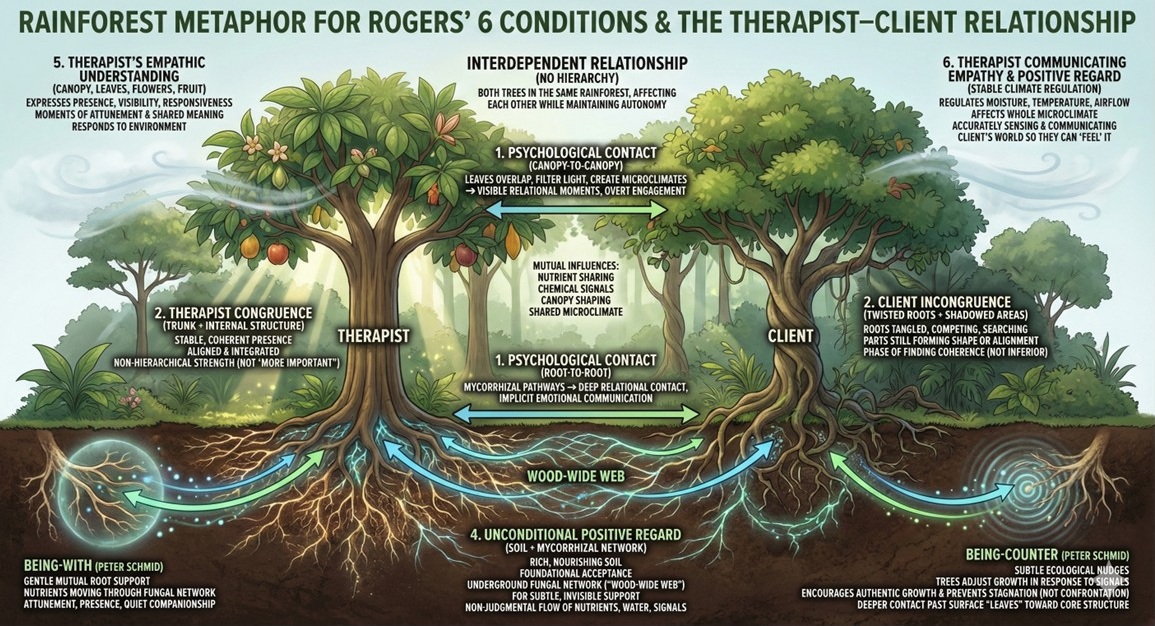
Content about Carl Rogers' 6 conditions for therapeutic change will be added here.
Personal Depth
This is a view from under the sea. When I look up, I can see the sunlight of this world above the surface. Going deeper down, I access the dark valleys with lava underneath. When the whole world is trying to teach me skills to go up, to move closer to the presentational level of the world we live in, there is an intuition in my heart calling me to go down.
This is the black hole that sucks away my life energy. This is the flame that burns my body every time I get close. I don't know what's down there, but I somehow know it holds the truth of my life. So I let go of all the safety buoyancy. I was burned many, many times.
And one day, I suddenly understood. These valleys are my existential valleys. These flames are agony. To be able to stay with this pain without trying to deny, distort, or run away, that is what presence really means.
When presence reaches deep, it is like roots growing into our core self, where energy and creativity can be channeled from personal depth all the way to the surface world, potentially reaching our clients and the people around us.

Communities and Resources
Throughout my journey as a therapist, I've found valuable support and inspiration from various communities and resources. Here are some that I've been following and recommend to fellow practitioners who might be interested.
Professional Organizations
tPCA (The Person-Centred Association)
A professional organization for person-centred practitioners in the UK, offering training, networking opportunities, and resources for therapists working within the person-centred approach.
Peer Support Groups
Good Enough Counsellors (Facebook Group)
A supportive Facebook community for counsellors and therapists, offering a space to share experiences, ask questions, and connect with peers in a non-judgmental environment.